
In this blog post, we’ll explore the new feature “Create with SharePoint Preview.” Currently in preview, this feature is designed to enhance the dynamic world of business applications, the integration of various platforms can streamline operations and enhance productivity. One such integration is between Microsoft SharePoint Lists and Dynamics 365 Tables. This integration allows users to leverage the collaborative features of SharePoint alongside the robust data management capabilities of Dynamics 365.
Creating a table in Dynamics 365 with external data from a SharePoint List involves several steps, which can be simplified using the “Create with SharePoint List preview” feature. This feature is part of the broader capabilities within Power Apps and the Dataverse environment, which facilitate the creation and management of tables.

Implementation:
- To use the “Create with SharePoint” feature, a SharePoint list is required as it serves as the data source for content.
- Go to https://make.powerapps.com.
- Sign into power apps.
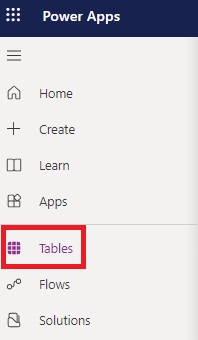
- Click on “Tables” from the left navigation panel.
- Click on “Create with SharePoint List”

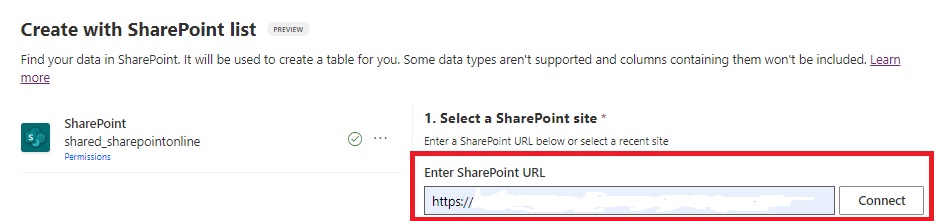
- Provide your SharePoint site URL.
- And click on connect.
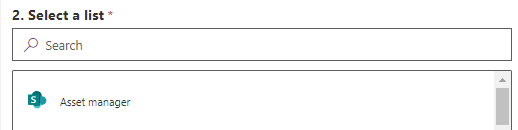
- Scroll down and you will get a list of your SharePoint List.
- Select list from which you want to create table.

- Here we have selected “Asset manager.”
- And click on “Next.”
- You will get a preview of your table.
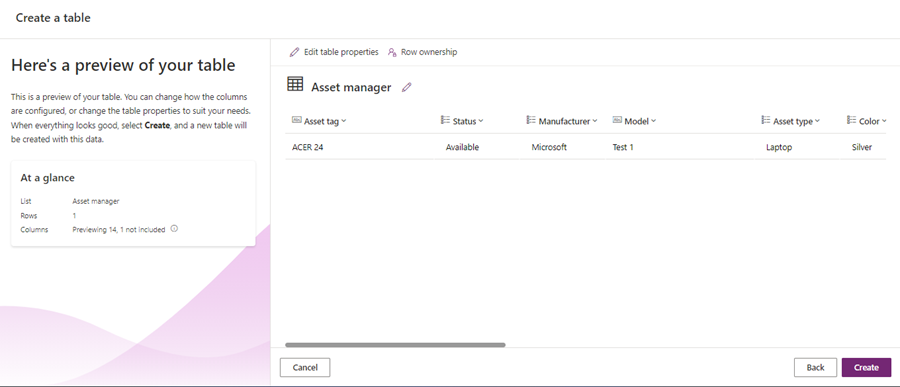
- Now click on “Create.”
- Your table is ready.
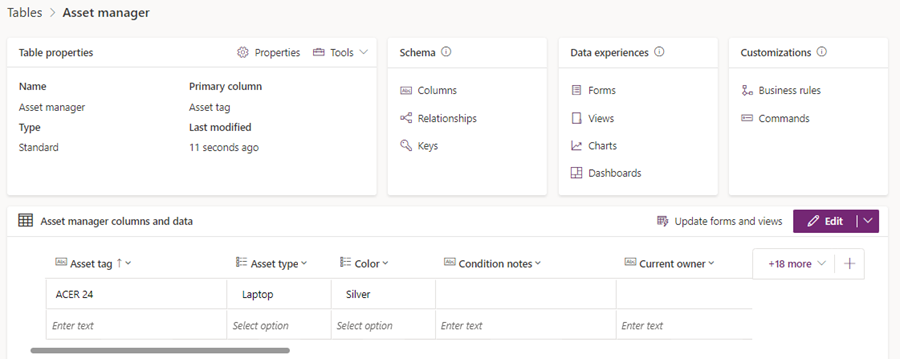
Output:
As you can see here our table is ready for use with all the columns in it same as SharePoint list.
Hope it helps!
Power 365ing as usual!
Any requirements, implementation or consulting work in Power Platform or Dynamics 365 – end user, Microsoft partner or an individual?
Problem Area – Technical, Functional, Training, Development or consulting?
Me and my team are here to assist, please fill the following form for your business needs: Click here

 MSDYNAMICSBLOG BY DEEPESH