
In this Blog post, we will learn about Catalog in Power Platform, Catalog in Power Platform is a game-changer for organizations that leverage Microsoft’s Power Platform to build and manage applications. As this feature is currently in preview, it offers a glimpse into how Microsoft plans to streamline the deployment and sharing of reusable components across environments. This blog will provide a comprehensive guide on the uses, benefits, and step-by-step installation of the “Power Platform Catalog Manager.”
Think of the Catalog as a well-organized library where developers can check out and reuse pre-built components, templates, and solutions. This not only accelerates the development process but also ensures consistency in how applications are built and deployed within an organization.

Installation of “Power Platform Catalog Manager”
The Power Platform Catalog Manager is a tool that allows you to manage your catalog effectively. Follow these steps to install and set it up in your environment.
- Go to this URL- https://appsource.microsoft.com/en-us/product/dynamics-365/powerappssvc.catalogmanager-preview?flightCodes=dde212e5c66047c59bf2b346c419cef6
- The application will launch in App Source because it is not accessible directly through the ‘Install Apps’ feature in Power Platform Dataverse environments.
- This will direct you to the App Source page.

- Click on “Get it now”, then you need to login with your Power Apps credentials.

- After signing you will get a window for confirming your credentials, click on “Get it now”.

- Subsequently, you will be directed to the displayed page, where it is necessary to choose the environment for installing the Catalog Manager.
- The selected environment will serve as the base for creating your Catalog, which will then be accessible across various environments.
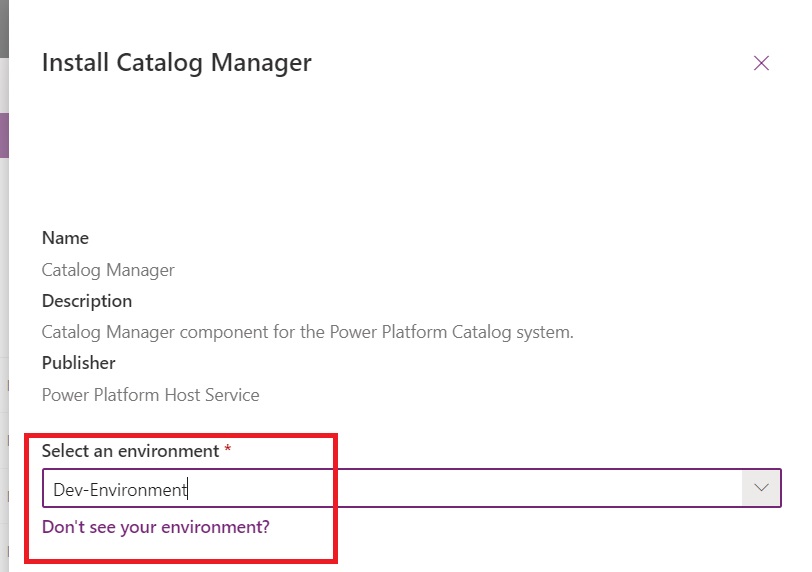
- After selecting environment, click the checkbox and then click on “Install.”
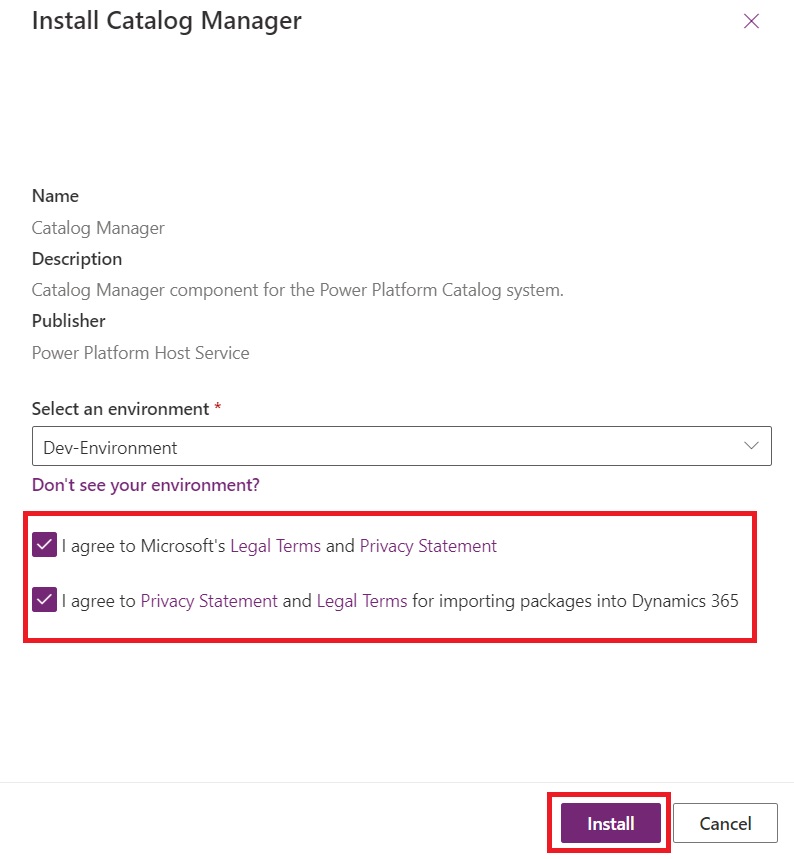
- It will take few minutes to get install.

- As you can see this app Is installed.

- Your “Power Platform Catalog Manager” is now installed and available in apps section.

Now that the Power Platform Catalog Manager is installed, you can start utilizing it to organize and deploy reusable components.
Key Uses of the Power Platform Catalog
- Component Reusability: The most significant advantage of the catalog is the ability to reuse components. Whether you’re building a Power App, an automated flow, or a custom connector, you can save these components in the catalog and reuse them across multiple projects. This reduces the need to rebuild common functionalities, saving both time and resources.
- Standardization Across Projects: The catalog ensures that all teams within an organization adhere to the same standards and best practices. By storing pre-approved templates and components, organizations can enforce consistency, reducing errors and ensuring that every project follows the same guidelines.
- Enhanced Collaboration: Collaboration becomes seamless when teams have access to a shared repository of resources. The catalog enables teams to share components with others easily, promoting a culture of collaboration and knowledge-sharing across departments.
- Streamlined Governance: With all components centralized, it’s easier for administrators to enforce governance policies. They can monitor usage, update components, and ensure compliance with organizational standards.
- Accelerated Development: Access to a library of pre-built components means developers can focus on customizing solutions rather than building them from scratch. This accelerates development, allowing for faster project delivery and more efficient use of resources.
Benefits of Using the Power Platform Catalog
- Increased Productivity: By reducing redundant work and providing access to reusable components, the catalog boosts productivity. Developers can spend less time building from scratch and more time customizing solutions to meet specific business needs.
- Cost Efficiency: The reuse of components reduces development costs, as teams no longer need to allocate resources to recreate functionalities that already exist within the catalog.
- Quality Assurance: Storing pre-approved, tested components in the catalog ensures that only high-quality, reliable resources are used across projects. This reduces the likelihood of errors and increases the overall quality of the solutions being developed.
- Improved Governance and Compliance: The centralized nature of the catalog allows administrators to maintain control over what components are used, ensuring compliance with organizational policies and standards.
- Simplified Maintenance and Updates: When components stored in the catalog need to be updated, these updates can be pushed out across all projects that use the component, simplifying maintenance and ensuring that all solutions are using the most current version.
The Power Platform Catalog is a powerful tool that not only enhances productivity but also enforces consistency and governance across your Power Platform environments. By centralizing reusable components, templates, and best practices, it enables teams to collaborate more effectively and accelerate development cycles. Whether you’re a developer looking to streamline your workflow or an administrator focused on maintaining governance, the catalog is an essential feature to explore.
With the Power Platform Catalog still in preview, now is the perfect time to start familiarizing yourself with its capabilities and prepare for its full release. By leveraging the Catalog Manager, you can start organizing and standardizing your Power Platform assets, ensuring that your organization is ready to maximize the benefits of this feature.
Hope it helps!
Power 365ing as usual!
Any requirements, implementation or consulting work in Power Platform or Dynamics 365 – end user, Microsoft partner or an individual?
Problem Area – Technical, Functional, Training, Development or consulting?
Me and my team are here to assist, please fill the following form for your business needs: Click here

 MSDYNAMICSBLOG BY DEEPESH